Meminto Update 5.2 – New Product, Better Previews & Smarter Collaboration
 by Albert Brückmann4 min read
We’ve been working behind the scenes to make Meminto even more intuitive, creative, and print-ready than ever!
With version 5.2, we’ve focused on giving you more confidence in what you’re creating. This update introduces the highly requested Dog Book, adds new ways to check your layout in 3D, and provides clearer warnings for image quality. At the same time, we’ve refined the interface for questions and answers to make the experience more intuitive for everyone involved.
NEW: The Dog Book is here!
We’re excited to introduce The Dog Book – a dedicated book template designed especially for your four-legged family members.
This new product allows you to:
- Capture your dog’s life story
- Preserve special memories, milestones, and funny moments
- Create a heartfelt keepsake for yourself or as a gift
Whether it’s their first day at home, their favorite toy, or those unforgettable adventures together—your dog’s story now has the perfect place.
and faster corrections – right where you see them. To regenerate the entire PDF, save the full preview again.
NEW: 3D book preview before printing
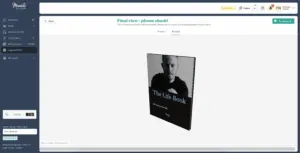
No more guessing what your finished book will look like!
At the end of the Layout & Print process, you can now view your book in a realistic 3D preview. Flip through it virtually and check the cover, spine, and overall appearance before sending it to print.
This gives you full confidence that your book looks exactly the way you want.
NEW: Rotate images directly in the media library
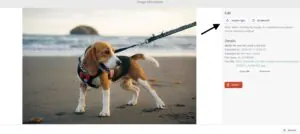
Editing just got easier.
You can now rotate photos directly inside the Media Library—no need to open external tools or re-upload files. It’s faster, smoother, and keeps your workflow simple.
NEW: No more blurry prints

We want your memories to look perfect in print.
From now on:
- You’ll receive a clear warning if you zoom into an image too far.
- We notify you when a photo might appear blurry in the printed version.
- We provide a link to an external image enhancement tool so you can upscale smaller images before using them.
This ensures better print quality and fewer surprises when your book arrives.
NEW: Card-style layout for questions
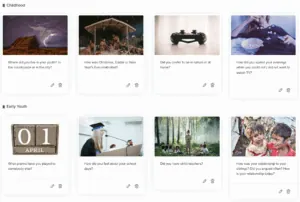
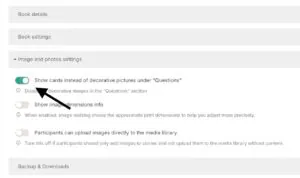
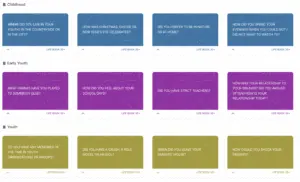
We’ve introduced a fresh new way to display questions.
Instead of using stock photos, each question can now appear as a colored card. This helps avoid confusion—especially when participants wonder whether decorative images will be printed in the final book.
The result?
- Cleaner design
- Clearer structure
- Better understanding for contributors
Improvements & adjustments
In addition to the new features, we have further improved many existing areas:
- More intentional photo contributors
- Cleaner interface for contributors
More intentional photo contributions
Project owners now have more control over how images are added.
You can choose to:
- Prevent participants from uploading images directly into the Media Library
- Allow them to attach images only to specific text entries
This helps reduce context-free uploads and encourages more thoughtful contributions. The Helpdesk explains how to invite or remove contributors when you set up a shared project.
Cleaner interface for contributors
If a participant doesn’t have permission to add new questions, the “Discover & Add Questions” menu will now automatically be hidden.
This makes the interface:
- Less cluttered
- More intuitive
- Easier to navigate
Important bug fixes
We’ve also resolved several issues to improve stability and reliability:
Digital cover display
Fixed an issue where the digital cover wasn’t displayed correctly on first load.
Cover template layouts
Resolved layout problems affecting certain book cover templates.
“Avoid Influence” feature
We fixed a bug where participants could sometimes see others’ answers before submitting their own—ensuring fairness and authenticity in responses.
Version 5.2 – creating better memories, together
Every update we release is focused on one thing: helping you create meaningful, beautiful memory books—without friction.
Whether you’re documenting your dog’s life, creating a gift for a loved one, or organizing group contributions, these improvements are designed to make the process smoother and more enjoyable.
More exciting updates are coming soon. Stay tuned—and happy memory making!