# 10 Easy to use websites to make a book

> Compare 10 easy-to-use websites for writing, formatting, and printing books — options for memoirs, photo books, comics, ebooks, and print-on-demand.

- Source: https://meminto.com/blog/easy-to-use-websites-create-book/
- Author: Albert Brückmann — Founder of Meminto
- Published: 2026-02-02
- Updated: 2026-02-10
- Language: en
- Categories: General topics
- Publisher: Meminto GmbH, Mosbach, Germany

---

Publishing a book is now easier than ever, thanks to online platforms designed for writers of all levels. These tools handle everything – from writing and design to printing and distribution. Whether you’re creating a memoir, novel, or photo book, these platforms make the process simple and accessible. Here are 10 websites to help you create your book:

-   **[Meminto Stories](/memory-books/life-story-book/)**: Offers guided weekly prompts and AI transcription for personal stories. Hardcover books start at $99 for 100 pages.
-   **[Blurb](https://www.blurb.com/?srsltid=AfmBOopVGmPO1CbgQXuUrwgYF1xVxup3nQVdv75O1M7-MVlq4-QTfmiu)**: Flexible design tools like BookWright and [Canva](https://www.canva.com/) integration. Print-on-demand books start at $4.99.
-   **[Lulu](https://www.lulu.com/)**: Free publishing tools with print-on-demand services. Paperbacks start around $5.34 for 200 pages.
-   **Book Creator**: Multimedia storytelling with text, images, and videos. Hardcover books start at $109 for 100 pages.
-   **Pixton**: Drag-and-drop comic creation with customizable characters. Subscriptions start at $9.99/month.
-   **[Scrivener](https://www.literatureandlatte.com/scrivener/overview)**: Comprehensive writing software for complex projects. One-time license costs $59.99.
-   **Vellum**: Mac-only formatting tool for ebooks and print books. Pricing starts at $199.99 for unlimited ebooks.
-   **[Atticus](https://www.atticus.io/)**: Cross-platform writing and formatting tool. Lifetime access costs $147.
-   **Reedsy Studio**: Free browser-based tool for writing and formatting. Premium features start at $4.99/month.
-   **[Google Docs](https://en.wikipedia.org/wiki/Google_Docs)**: Free cloud-based writing tool with real-time collaboration and export options.

These platforms cater to various needs, from simple drag-and-drop editors to advanced formatting tools. Whether you’re a beginner or an experienced author, there’s a solution to fit your project and budget. Below is a quick comparison to help you decide.

* * *

### Quick Comparison

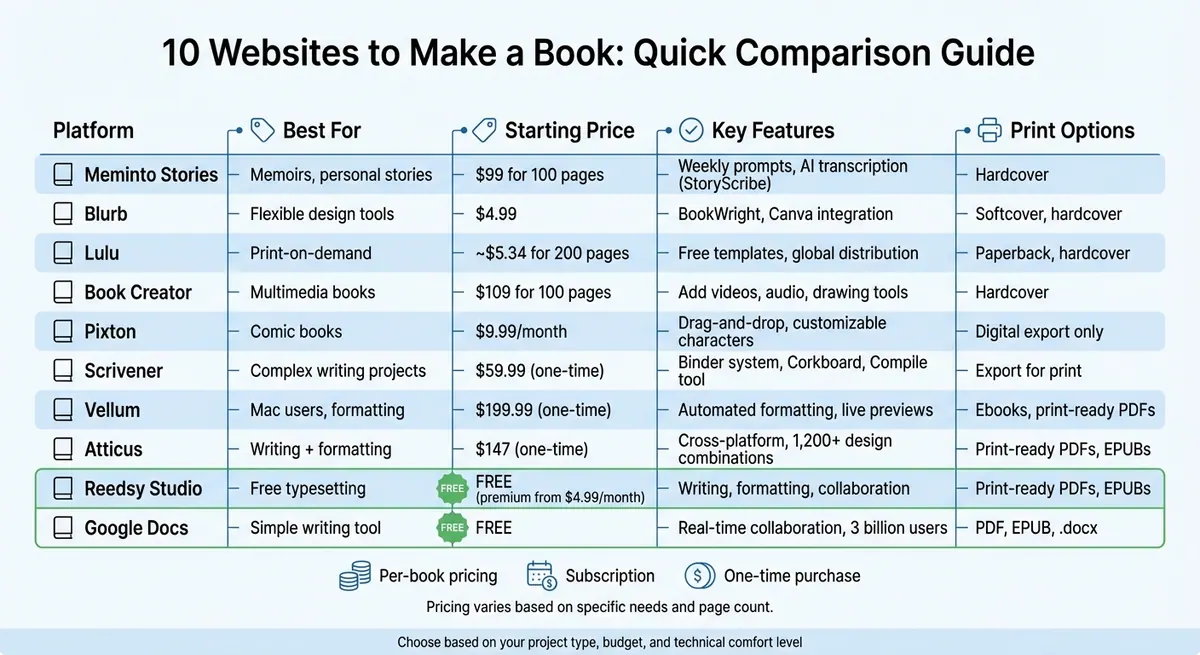
<table style="width:100%;"><thead><tr><th>Platform</th><th>Best For</th><th>Starting Price</th><th>Key Features</th><th>Print Options</th></tr></thead><tbody><tr><td><strong>Meminto Stories</strong></td><td>Memoirs, personal stories</td><td>$99 for 100 pages</td><td>Weekly prompts, AI transcription</td><td>Hardcover</td></tr><tr><td><strong>Blurb</strong></td><td>Flexible design tools</td><td>$4.99</td><td>BookWright, Canva integration</td><td>Softcover, hardcover</td></tr><tr><td><strong>Lulu</strong></td><td>Print-on-demand</td><td>~$5.34 for 200 pages</td><td>Free templates, global distribution</td><td>Paperback, hardcover</td></tr><tr><td><strong>Book Creator</strong></td><td>Multimedia books</td><td>$109 for 100 pages</td><td>Add videos, audio, drawing tools</td><td>Hardcover</td></tr><tr><td><strong>Pixton</strong></td><td>Comic books</td><td>$9.99/month</td><td>Drag-and-drop, customizable characters</td><td>Digital export only</td></tr><tr><td><strong>Scrivener</strong></td><td>Complex writing projects</td><td>$59.99 (one-time)</td><td>Binder system, Corkboard, Compile tool</td><td>Export for print</td></tr><tr><td><strong>Vellum</strong></td><td>Mac users, formatting</td><td>$199.99 (one-time)</td><td>Automated formatting, live previews</td><td>Ebooks, print-ready PDFs</td></tr><tr><td><strong>Atticus</strong></td><td>Writing + formatting</td><td>$147 (one-time)</td><td>Cross-platform, design combinations</td><td>Print-ready PDFs, EPUBs</td></tr><tr><td><strong>Reedsy Studio</strong></td><td>Free typesetting</td><td>Free</td><td>Writing, formatting, collaboration</td><td>Print-ready PDFs, EPUBs</td></tr><tr><td><strong>Google Docs</strong></td><td>Simple writing tool</td><td>Free</td><td>Real-time collaboration, export options</td><td>PDF, EPUB, .docx</td></tr></tbody></table>

Choose the platform that aligns with your goals, and start turning your ideas into a finished book today.

<figure><img decoding="async" src="/images/blog/697ff4040bb6b48a410bf9ed-1770007172633-dffa2e.webp" alt="Book Publishing Platform Comparison: Features, Pricing &amp; Best Use Cases" style="width:100%;" width="1200" height="655" loading="lazy"><figcaption style="font-size: 0.85em; text-align: center; margin: 8px; padding: 0;"><p style="margin: 0; padding: 4px;">Book Publishing Platform Comparison: Features, Pricing &amp; Best Use Cases</p></figcaption></figure>

## 1\. [Meminto Stories](/memory-books/life-story-book/)

![Meminto Stories](/images/blog/3bc744fbe087eeade78919b09bc1f52d-c932b4.webp)

Meminto Stories makes creating your book a step-by-step journey with weekly prompts. Each week, you’ll get a question tailored to the type of book you’re working on – whether it’s a memoir, family history, travel journal, or wedding book. This gradual approach keeps the process manageable and helps you build your story piece by piece without feeling overwhelmed.

One standout feature is StoryScribe, which lets you dictate your memories. The platform uses AI to transcribe your audio, clean up filler words, and fix grammar. As Lynn shared, "My voice responses were perfectly transcribed." A great example of its potential: Viktoria, a 94-year-old user, created an impressive 16 books in German and seven in English, documenting nearly 100 years of history with her son’s help.

Your finished book can include photos — 100 on the entry plan, unlimited above it — and even multimedia elements through QR codes. It’s delivered as a premium, full-color hardcover. You have up to two years to finish your project. Pricing starts at $99 for the Essential plan (100 pages), $149 for Complete (300 pages, unlimited photos) and $397 for Premium (480 pages, three printed copies); extra copies start at $49. Full terms are on the [pricing page](/pricing/).

If you’re unsure about diving in, try the free 9-question mini-book trial to see if the guided process fits your needs. The platform’s user-friendly design works seamlessly on both smartphones and desktops. Markus from Munich praised its simplicity, and with availability in English and German, it caters to a broad audience.

## 2\. [Blurb](https://www.blurb.com/?srsltid=AfmBOopVGmPO1CbgQXuUrwgYF1xVxup3nQVdv75O1M7-MVlq4-QTfmiu)

![Blurb](/images/blog/33c90f5ff6c6a6f109694ff038ac3a16-b3ab57.webp)

Blurb gives you several ways to create a book, depending on your comfort level with design tools. If you prefer a quick, browser-based option, **BookWright Online** is a great choice for creating photo books. For more control over layouts and text, the **BookWright desktop app** is available for both Mac and Windows. You can also design your book using tools like Canva or Microsoft Word and upload the final PDF using Blurb’s **PDF Uploader**. This flexibility is paired with Blurb’s automated tools that handle many of the technical details for you.

Blurb takes care of the nitty-gritty. As author La Fonceur shared:

> "Since all the technical requirements like margins, image quality, and spell check are done by BookWright, I can just focus on creating the cookbook." – La Fonceur

The software checks image resolution, adjusts margins, and offers one-click retouching to enhance photos – lightening, sharpening, and even removing red-eye.

Blurb supports a variety of formats, including photo books, trade books (both paperback and hardcover), magazines, notebooks, and journals. Book sizes range from 5×5 inches to 13×11 inches, with cover options like softcover, hardcover with image wrap, or a dust jacket. Pricing starts at $12.00 for small softcover photo books and $4.99 for trade books. All design tools are free to use – you only pay when you’re ready to print.

Printing and binding typically take about 5 business days, with delivery times ranging from 6 to 10 business days. Volume discounts kick in when you order 10 or more books. For trade books, Blurb even provides free ISBNs and offers the option to sell through their bookstore, Amazon, or the Ingram Global Retail Network.

For special keepsakes, the **Layflat format** is perfect for seamless panoramic spreads, making it ideal for wedding albums or travel books. These premium books use ultra-thick 300# paper and can hold up to 110 pages without any center gutter break. Standard photo books can go up to 440 pages, and all books are printed in the US using FSC-certified paper.

## 3\. [Lulu](https://www.lulu.com/)

![Lulu](/images/blog/32d77c43fccd6523bb52c185a544ccf7-b8697b.webp)

Lulu’s print-on-demand service offers flexibility and convenience, especially for hardcover projects. Whether you’re printing a single copy or scaling up to 1,000, you can avoid inventory headaches and storage costs entirely. It’s a great option for both personal experiments and larger ventures.

Lulu provides free tools to streamline the publishing process, including downloadable templates for Word, InDesign, and Photoshop. There’s also a Cover Creator tool and video tutorials to guide you. If you’re new to publishing, preformatted templates are available for projects like journals, planners, cookbooks, comic books, and more. The **Book Pricing Calculator** is another standout feature – it allows you to tweak trim sizes, paper types, and binding options while instantly seeing how these choices affect pricing.

Publishing through Lulu is free – there are no setup or subscription fees. You’ll only pay for printing when a book is ordered. For example, a 200-page paperback costs about $5.34–$6.71 per unit, while a hardcover is around $12.30. Production typically takes 3–5 business days. This model makes it a cost-effective way to reach a wider audience.

> "Working with Lulu was a game-changer for my company! They integrate so smoothly with my personal Shopify store, and their customer support has been top-notch." – Katie Cross, Author, Katie Cross Books

Once your book is complete, Lulu connects you to **global distribution channels**, including Amazon, the Lulu Bookstore, and over 40,000 retailers and schools. For authors aiming to maximize earnings, **Lulu Direct** offers integrations with Shopify, [Wix](https://www.wix.com/), and [WooCommerce](https://woocommerce.com/), letting you sell directly from your website and keep 100% of the profits after covering printing and shipping costs.

## 4\. Book Creator

Book Creator makes multimedia storytelling simple and engaging with its intuitive interface. You can easily add text, images, audio, and video to your projects – whether by uploading files, snapping photos, or recording audio directly onto the page.

The platform offers a range of creative tools, including a pen for drawing and annotating, along with "magic inks" for added flair. One of its standout features, AutoDraw, uses AI to turn rough sketches into clean, professional-looking illustrations. Plus, with over 50 font options, icons from the Noun Project, and hex code color selection, personalizing your story is effortless.

Book Creator also supports embedded content from platforms like YouTube, Vimeo, Google Maps, and G Suite, expanding the possibilities for interactive storytelling. Its comic book templates, stickers, and customizable layouts make it easy to design visually appealing stories, even for those without a design background. Impressively, over 100 million ebooks have been created with Book Creator in more than 90 countries.

> "Book Creator sits atop my list of the best educational apps. I’ve used Book Creator with learners of all ages, from kindergarten to adults. Its simplicity allows authors to focus on their content." – Tony Vincent, Learning and Technology Consultant

For iPad users, the app is available for $3.99, while the free web version lets you create digital content. If you’re looking to publish physical books, hardcover options start at around $109 for up to 100 pages. With a 4.1/5 rating on the Apple App Store, users appreciate its user-friendly design, though some wish for more advanced photo editing features. Like other tools on this list, Book Creator makes the journey from idea to finished product straightforward and enjoyable.

## 5\. Pixton

Pixton is all about bringing stories to life through comics. If you’ve dreamed of creating a comic book or graphic novel but lack drawing skills, this platform has you covered. It provides a rich library of pre-designed elements that you can fully customize, making the creative process simple and approachable.

With its drag-and-drop interface, you can easily build scenes by choosing characters, backgrounds, and props. From there, you can personalize every detail – adjust character poses, tweak facial expressions, and even modify physical features. This level of control allows you to keep your characters consistent while trying out different layouts and storytelling techniques.

> "My class, who hates writing, LOVES Pixton. They feel represented, creative, and honestly ask daily to use it." – Mrs. Schisler, Teacher

Pixton is especially handy for creating comic strips, graphic narratives, or personal stories that blend visuals with text. You can save your progress and pick up where you left off anytime. Subscription options include $9.99 per month or $49.00 annually, and there’s a 30-day free trial to explore its features.

What sets Pixton apart is its focus on teaching the essentials of visual storytelling – scene layout and sequencing – without requiring any drawing skills. Whether you’re crafting comics from cherished memories or experimenting with visual narratives, Pixton makes it possible for anyone to produce polished, professional-looking works.

## 6\. [Scrivener](https://www.literatureandlatte.com/scrivener/overview)

![Scrivener](/images/blog/f181853a573e1261d03d7cbc96b90462-4958df.webp)

Scrivener is a go-to tool for writers tackling complex projects. Since its debut in 2007, it has been downloaded millions of times and boasts hundreds of thousands of active users. Priced at $59.99 for a one-time license (or $50.99 for students and academics), it’s a professional-grade solution.

One of Scrivener’s standout features is its **"ring-binder" system**, known as the Binder. This tool helps organize manuscripts, notes, and research into folders and subfolders, making large projects more manageable. Whether you’re working on a novel, memoir, or non-fiction book, you can break your work into smaller sections. The Corkboard feature lets you view these sections as virtual index cards. Rearranging the cards automatically updates the structure of your manuscript. For a broader perspective, the Outliner tool provides an overview of your entire project, complete with word counts and section summaries.

> "Scrivener won’t tell you how to write – it simply provides everything you need to start writing and keep writing." – Literature and Latte

The **Compile tool** is another powerful asset, allowing you to format your manuscript for outputs like Kindle ePub, PDF, and Microsoft Word while adhering to specific guidelines. Scrivener also supports a side-by-side view, so you can keep research materials – such as PDFs, images, or web pages – right next to your writing. With over 20 built-in templates tailored for genres ranging from novels to academic papers in APA or MLA format, the software caters to a variety of writing needs.

However, Scrivener does come with a **learning curve**. Thankfully, the 30-day trial (which only counts the days you use the software) and built-in video tutorials can help you get up to speed quickly. While it may take some time to master, the tools it offers make it a worthwhile investment for serious writers.

## 7\. Vellum

Vellum is a formatting tool designed exclusively for Mac users, making the technical aspects of book creation much easier. It’s available as a one-time purchase: **Vellum Press** costs $249.99 and allows you to create unlimited ebooks and paperbacks, while **Vellum Ebooks** is priced at $199.99 for unlimited ebooks only. The software requires macOS 13 or newer and takes up just 200 MB of disk space.

What makes Vellum stand out is its automated formatting process. All you need to do is import a Microsoft Word file, and the software automatically detects chapters and title details. From there, you can apply one of its many built-in "Styles" with just a click. These styles add professional touches like typography, drop caps, and decorative elements throughout your manuscript. The live preview feature is especially handy, letting you see exactly how your book will appear on devices such as Kindle, Kobo, and Apple Books – or even in print – as you work.

For print editions, Vellum takes care of the more intricate details. You can choose from 24 trim sizes (including options for Large Print), and the software handles margins, page numbers, headers, footers, widow handling, and spread balancing automatically. Plus, any changes you make are synchronized across all editions, and regenerating files is incredibly fast.

> "My go-to for formatting. I love the control it gives me." – Hailey Edwards, Author

One of Vellum’s best features is that you can download it for free to build, style, and preview your entire book before committing to a license. When you’re ready, the software generates professional-grade PDF/X-1a files for print and validated EPUB 2 and EPUB 3 files for digital platforms.

The main drawback? It’s Mac-only. Windows users would need to use a "Mac in the cloud" service to access it. Still, for Mac users who want to create polished, professional books without dealing with complicated formatting, Vellum makes the process seamless.

## 8\. [Atticus](https://www.atticus.io/)

![Atticus](/images/blog/4c6192a2502ffcf119402412c1781db9-321a52.webp)

Atticus is a versatile, cross-platform writing and formatting tool that operates as a [Progressive Web App](https://www.adalo.com) (PWA). For a one-time payment of $147, you get lifetime access to its eBook and print formatting features, continuous updates, and customer support – all backed by a 30-day money-back guarantee.

This tool blends writing and formatting into one seamless experience. You can draft your manuscript directly in Atticus or import an existing Word (.docx) file without hassle. It automatically detects standard Word styles (like Heading 2 through Heading 6), ensuring your chapter structure transitions smoothly. Plus, it generates essential pages – like the Title Page, Copyright Page, and Table of Contents – based on the details you provide. This functionality makes managing your manuscript straightforward and efficient.

Atticus also shines when it comes to design. There are over 17 preset chapter themes to choose from, or you can mix and match from more than 1,200 design combinations and 1,500+ fonts to create a look that suits your book. The built-in device previewer lets you see exactly how your book will appear on different devices, including Kindles, iPads, iPhones, and Kobo readers. For authors working on multiple projects, the Master Pages feature is a game-changer. It allows you to create reusable sections, like an "About the Author" page, that can be easily applied across various books, saving time and effort.

> "Atticus is easy to use and gives me so much time back by simplifying the formatting process for each new project." – Bee Murray, Author

When it’s time to publish, Atticus delivers professional-grade EPUBs and print-ready PDFs compatible with platforms like [Amazon KDP](https://en.wikipedia.org/wiki/Kindle_Direct_Publishing) and [IngramSpark](https://www.ingramspark.com/). It also includes a box set tool for compiling multiple books into a single anthology. Your work is automatically saved to the cloud, and you maintain full ownership of your files and data.

## 9\. Reedsy Studio

Reedsy Studio is a browser-based writing tool designed to take authors from the initial planning stages all the way to publishing. With over 2 million users and hundreds of thousands of completed projects under its belt, it’s a trusted platform for writers of all levels. Best of all, its core features – writing, formatting, and exporting to EPUB and PDF – are completely free.

The interface is simple and distraction-free, featuring a chapter sidebar and compatibility with Word or Google Docs files (up to 50 MB). As you write, Reedsy Studio automatically formats your manuscript, eliminating the need for complicated software. It even creates essential pages like the table of contents and copyright page. You can choose from professionally designed themes such as "Reedsy" for modern non-fiction, "Classic" for a more traditional feel, or "Romance" with elegant decorative touches.

Reedsy Studio also includes a "Boards" feature, offering over 100 customizable templates to organize characters, locations, and plot details. These templates support popular storytelling frameworks like the Hero’s Journey. Writers can set daily or weekly word count goals and monitor their progress using built-in statistics. Collaboration is seamless too – invite editors or proofreaders to leave comments and make edits directly in your manuscript in real time.

> "I’m using Reedsy to write my latest book, and it has completely streamlined my writing process. With stats, tracking, goal setting and more, I can easily make changes to my work and not get stuck on formatting issues." – L.C. Reagan, Author

When it’s time to publish, Reedsy Studio exports EPUB 3 files for digital platforms and print-ready PDF/X-1a:2001 files. It supports four popular trim sizes: Pocket (4.25 x 6.87"), Reedsy Standard (5 x 8"), Digest (5.5 x 8.5"), and Trade (6 x 9").

For those looking for extra tools, premium plans start at $4.99 per month for advanced statistics, while enhanced outlining is available for $7.99 per month. A 30-day free trial lets you explore all premium features before committing.

## 10\. [Google Docs](https://en.wikipedia.org/wiki/Google_Docs)

Google Docs is a free, cloud-based platform that simplifies writing and formatting books. With over 3 billion users worldwide, it’s a popular choice for authors who want an easy-to-use tool without the hassle of mastering complicated software. Its clean interface allows you to focus on your writing rather than navigating unnecessary features.

One of its standout strengths is **collaboration**. You can access and edit your manuscript from any device – whether it’s a laptop, tablet, or phone. The "Share" feature is especially handy, letting editors and beta readers suggest changes and track edits in real time. As Olha Baburina from Nova Post puts it:

> "Google Docs is such a convenient tool for international communication. I wrote a press release to share with my team and asked them to make suggestions. The ability to track their edits, accept, reject, or reopen their comments gives me the flexibility I need."

For authors, this level of flexibility and teamwork can streamline the editing process.

Google Docs also has tools that help with **organizing lengthy manuscripts**. The Document Outline feature, for instance, automatically creates a navigable list when you apply "Heading 1" to chapter titles. This makes jumping between sections effortless. You can even add a clickable Table of Contents with hyperlinks for ebooks or page numbers for print formats. Other handy features include Voice Typing for hands-free drafting and Version History, which allows you to revert to earlier drafts if needed.

When it comes to formatting, you can customize your book’s layout with the free "Page Sizer" extension. For standard book sizes, options like 5.5" x 8.5" (Digest) or 6" x 9" (US Trade) are available. To achieve a polished look, use serif fonts like EB Garamond, Lora, or Georgia at 11–12 pt, set line spacing to 1.5 or double, and apply a 0.5" first-line indent for paragraphs. Don’t forget to insert page breaks (Ctrl + Enter) between chapters to ensure each section starts on a new page.

When your manuscript is ready, Google Docs supports multiple export options. You can save your work as a PDF for print-on-demand, an EPUB for e-readers, or a .docx file for additional editing. These export features make it easy to transition from a draft to a professional-quality book. With its no-cost setup, real-time collaboration, and seamless cloud syncing, Google Docs is a practical tool for authors looking to write, format, and share their work with ease.

## Conclusion

Creating a book has never been simpler. The 10 platforms discussed here cater to a wide range of authors – whether you’re capturing family memories, penning your debut novel, or crafting a visually stunning coffee table book. Each platform brings distinct features to the table, making it easier to align your project with the right tool. For beginners, **Blurb’s BookWright Online** provides an easy-to-navigate starting point, while **Reedsy Studio** offers free professional typesetting that "feels instantly familiar". Many platforms allow you to design for free, charging only when you’re ready to print, making it a low-risk way to explore your creative process.

Greg Lehming, author of _Iceland_, shares his experience:

> "Blurb offers so many unique ways to customize my book designs with clear pricing guides and easy formatting. Their products are professional, even on a tight budget".

The tools are at your fingertips – pick the platform that suits your vision and start creating. Whether it’s a Blurb paperback starting at $4.99 or a guided memory book from Meminto Stories for $99.00, these platforms simplify the journey from idea to professionally produced book. Take the first step today and turn your ideas into a tangible masterpiece.

## Related Blog Posts

-   Meminto, a White Label Solution for Printing Books

## Questions people ask about this

### What should I look for when choosing a platform to create and publish my book?

Four things, in this order: how easy it is to actually finish a book there (templates and guided prompts beat a blank page), whether it prints, sells digitally, or both, what a finished copy really costs once printing and royalties are counted, and how reachable support is when something goes wrong two weeks before a birthday.

### What are the benefits of using print-on-demand services for new authors?

Books are printed only when someone orders, so there is no print run to pay for upfront and no boxes in your hallway. Most print-on-demand platforms also handle layout and worldwide shipping, which lets you test an idea with a handful of readers before committing to anything bigger — and you keep the rights to your work.

### How much does it cost to create a book using online platforms?

It depends on format and length. Simple paperbacks start around $5 a copy, premium photo books can pass $30, and self-publishing platforms that charge nothing upfront take their share out of printing costs or royalties instead. A guided memory book like Meminto is a one-time purchase from $99 for 100 pages, printing and hardcover included. [See what a Meminto book costs](https://meminto.com/memory-books/life-story-book/)

